Grok Imagine 1.5 AI Video Generator
Grok Imagine 1.5 animates a still image into video with dialogue, sound effects, and ambience in one pass. Clips land straight in your VideoGen timeline.
By xAI · Generally available June 2026 · xAI's best image-to-video model yet: better motion, physics, and audio at nearly double the speed
Example outputs from Grok Imagine 1.5
Real prompts, real outputs, generated with Grok Imagine 1.5 in VideoGen.

“The orange sneaker rotates slowly above the podium, studio lights glinting off the mesh, a soft whoosh of air and a low ambient studio hum”
Generated with Grok Imagine 1.5 in VideoGen
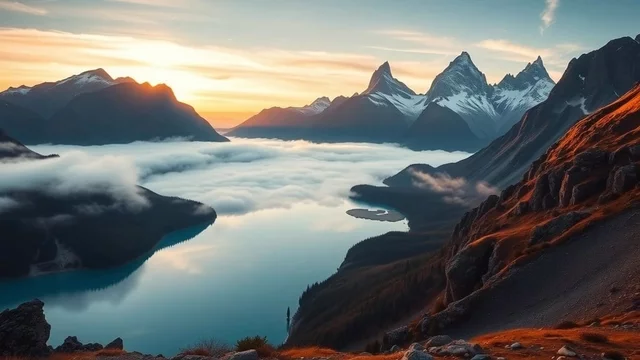
“Morning mist drifts across the alpine lake as the sunrise strengthens, gentle ripples lap the shore, distant birdsong and soft wind”
Generated with Grok Imagine 1.5 in VideoGen

“Slow cinematic push-in on the cafe chalkboard menu, potted plants swaying softly, espresso machine hissing and quiet cafe chatter in the background”
Generated with Grok Imagine 1.5 in VideoGen
How VideoGen integrates Grok Imagine 1.5
| Specification | Details |
|---|---|
| Max duration | 15 seconds per clip |
| Resolutions | 480p, 720p, and 1080p |
| Native audio | Yes: dialogue, sound effects, and ambience in one pass |
| Mode | Image-to-video: a starting image plus a motion prompt |
| Aspect ratios | Matches the input image, or 16:9, 9:16, 1:1, 4:3, 3:4, 3:2, 2:3 |
| Speed | The Fast variant generates a 6-second 720p clip in about 25 seconds |
| Frame rate | 24 fps |
| Elo Benchmark | 1,115 (Image to Video Arena (with audio)) |
Quality tiers in VideoGen
- Low
The fastest and most affordable tier, built for drafts and quick iteration.
- Standard
The balanced default: good quality video clips at an everyday cost.
- High
Premium quality video clips for the content you publish.
- Max
Our highest quality tier for detailed, polished video clips.
Use Grok Imagine 1.5 directly in VideoGen to create video clips. Choose a quality tier, generate your content, and add it to a finished video in the same workspace.
How to use Grok Imagine 1.5 in VideoGen
Create a free account
Sign up for VideoGen to open the AI playground and editor.
Open a workflow
Start the storyboard to video or prompt to video workflow, or use the AI video tool inside any project.
Pick a quality tier or type a prompt
Choose the tier that fits your needs and describe what you want to create.
Generate and build your video
VideoGen builds the finished video with visuals, narration, and captions, ready to export.
Grok Imagine 1.5 API
Developers can generate video clips through the VideoGen API with the same quality tier routing as the app, so requests reach models like Grok Imagine 1.5 without managing provider keys.
curl -X POST "https://api.videogen.io/v1/tools/generate-video-clip" \
  -H "Authorization: Bearer $VIDEOGEN_API_KEY" \
  -H "Content-Type: application/json" \
  -d '{"prompt": "A drone shot over a coastal town at sunrise", "durationSeconds": 8}'
Bring your stills to life
Animate a product shot, portrait, or illustration into a clip with synchronized sound, then refine the motion prompt until it feels right.
Motion that holds together
Version 1.5 improves motion and physics over the previous model, with fewer warps and more believable weight and momentum across the length of a clip.
Speech that lands on the action
Sound effects, ambience, and dialogue are generated in the same pass as the video, with clearer speech and tighter sync than the previous model.
Iterate at near-double speed
Grok Imagine 1.5 Fast produces a 6-second 720p clip in about 25 seconds, down from 40 or more, so you can try more directions in the same session.
“VideoGen is awesome for scaling video production and improving turnaround time... The complex process of video editing, which could take days or months, now takes minutes!”
“VideoGen solves the biggest pain points of video production—complexity, cost, and time. In just a few clicks, anyone can create professional, copyright-free videos.”
“VideoGen is the most underrated tool for content creators who want to put out the highest quality content in the shortest amount of time.”
Frequently asked questions
Go from Grok Imagine 1.5 outputs to finished videos
Every VideoGen workflow uses models like Grok Imagine 1.5 automatically to build complete videos with visuals, narration, music, and captions.
Start creating with AI on VideoGen.
Sign in to generate images, video clips, and more with the models you choose.