MiniMax AI Video Generator
The Hailuo model family delivers realistic motion at a competitive cost. VideoGen runs the latest release, Hailuo 2.3, inside full video workflows.
By MiniMax · Latest video model Hailuo 2.3, released October 2025 · Hailuo family known for realistic motion and cost-effectiveness
Example outputs from MiniMax
Real prompts, real outputs, generated with MiniMax in VideoGen.
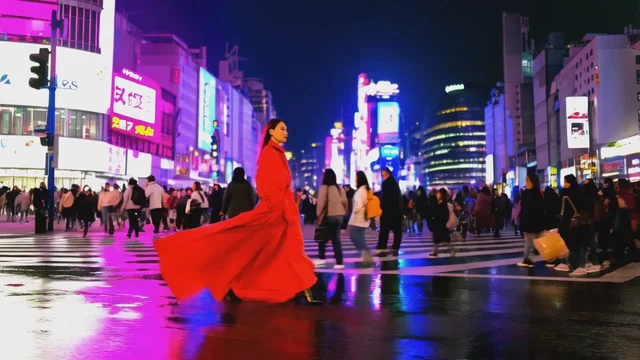
“A stylish woman in a flowing red coat strides through a neon-lit Shibuya crossing at night, crowds parting around her, reflections shimmering on wet asphalt, confident cinematic tracking shot”
Generated with MiniMax in VideoGen
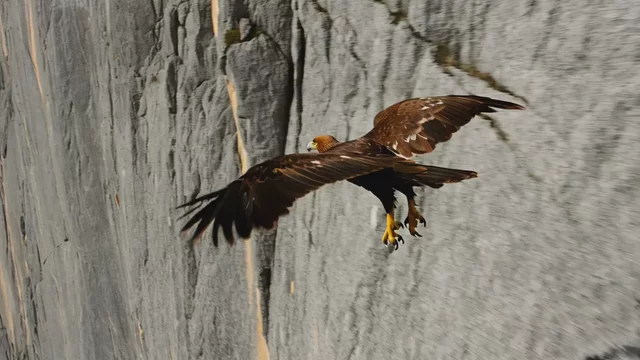
“A golden eagle folds its wings and dives along a sheer granite cliff face, camera plummeting alongside, feathers rippling in the wind, valley floor rushing up below”
Generated with MiniMax in VideoGen

“Inside a candlelit alchemist's workshop, a glowing turquoise potion bubbles over as sparks spiral up from the flask, shelves of jars flickering in the warm light, slow push-in shot”
Generated with MiniMax in VideoGen
How VideoGen integrates MiniMax
| Specification | Details |
|---|---|
| Latest model | Hailuo 2.3 |
| Max duration | 10 seconds at 768p, 6 seconds at 1080p |
| Max resolution | 1080p |
| Native audio | No, video only |
| Input types | Text and image |
| Elo Benchmark | Unknown |
Quality tiers in VideoGen
- Low
The fastest and most affordable tier, built for drafts and quick iteration.
- Standard
The balanced default: good quality video clips at an everyday cost.
- High
Premium quality video clips for the content you publish.
- Max
MAX always integrates the state of the art. MiniMax is part of that set.
Every quality tier routes each request to the best model based on our internal evals, compliance requirements, and your intent. Requests stay fully compliant at every tier: sensitive data is never routed to models hosted by foreign adversaries such as China.
How to use MiniMax in VideoGen
Create a free account
Sign up for VideoGen to open the AI playground and editor.
Open a workflow
Start the storyboard to video or prompt to video workflow, or use the AI video tool inside any project.
Pick a quality tier or type a prompt
Choose the tier that fits your needs and describe what you want to create.
Generate and build your video
VideoGen builds the finished video with visuals, narration, and captions, ready to export.
MiniMax API
Developers can generate video clips through the VideoGen API with the same quality tier routing as the app, so requests reach models like MiniMax without managing provider keys.
curl -X POST "https://api.videogen.io/v1/tools/generate-video-clip" \
  -H "Authorization: Bearer $VIDEOGEN_API_KEY" \
  -H "Content-Type: application/json" \
  -d '{"prompt": "A drone shot over a coastal town at sunrise", "durationSeconds": 8}'
Realistic AI video generation
Turn text prompts and visual ideas into polished video clips with natural motion and cinematic style.
Create realistic motion
Minimax helps generate clips with believable movement, camera direction, and scene composition for social posts, ads, and B-roll.
Move from prompt to footage fast
Describe the subject, action, and style you want, then generate clips you can trim and combine with the rest of your project.
Finish everything in VideoGen
Bring Minimax clips into the editor alongside scripts, subtitles, music, and voiceovers without jumping between tools.
“VideoGen is awesome for scaling video production and improving turnaround time... The complex process of video editing, which could take days or months, now takes minutes!”
“VideoGen solves the biggest pain points of video production—complexity, cost, and time. In just a few clicks, anyone can create professional, copyright-free videos.”
“VideoGen is the most underrated tool for content creators who want to put out the highest quality content in the shortest amount of time.”
Frequently asked questions
Go from MiniMax outputs to finished videos
Every VideoGen workflow uses models like MiniMax automatically to build complete videos with visuals, narration, music, and captions.
Start creating with AI on VideoGen.
Sign in to generate images, video clips, and more with the models you choose.
Related AI video models
- Hailuo AICost-effective AI video with realistic motion
- Hailuo 3.02K AI video with native stereo audio and 15-second clips
- Hailuo PromptsCopy-paste Hailuo prompts for realistic AI video motion
- Best AI Video ModelsThe best AI video models in 2026, ranked and benchmarked