GPT Image 2.5
สร้างภาพการตลาด ภาพประกอบพรีเซนเทชัน และการแก้ไขโดยอ้างอิงรายละเอียดด้วย GPT Image 2.5 Flare ภายในเวิร์กโฟลว์ของ VideoGen
โดย OpenAI · เปิดตัวเมื่อเดือนกันยายน 2026 · โมเดล API GPT Image 2.5 ที่รวดเร็วยิ่งขึ้นสำหรับการสร้างภาพคุณภาพสูงและการแก้ไขที่แม่นยำ
ตัวอย่างผลลัพธ์จาก GPT Image 2.5 Flare
พรอมต์จริง ผลลัพธ์จริง สร้างด้วย GPT Image 2.5 Flare ใน VideoGen
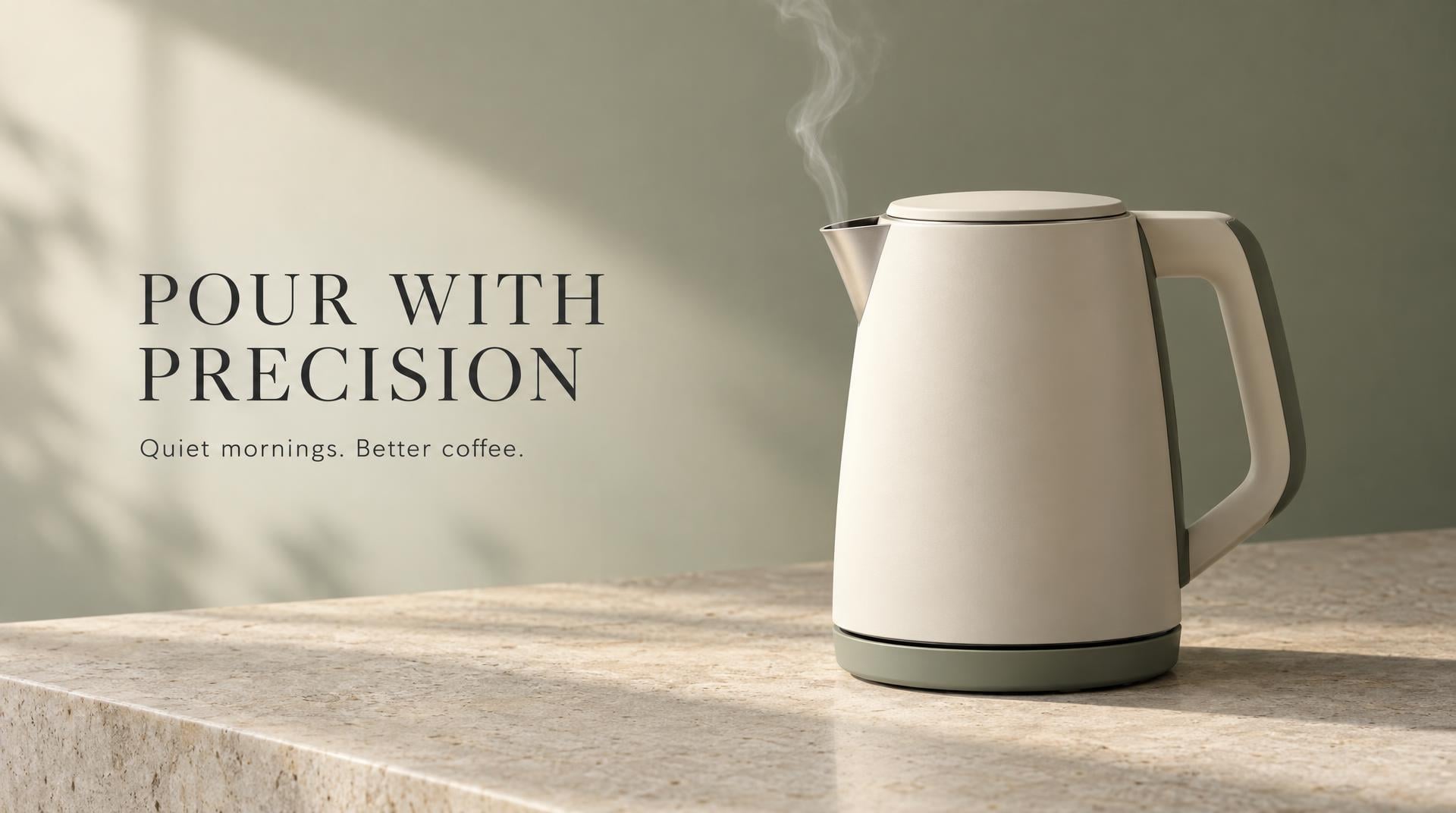
“Premium ecommerce campaign image for a matte cream electric kettle named LUMA, three-quarter product view on pale limestone, a thin ribbon of steam, warm morning side light, restrained sage and charcoal palette. Editorial layout with generous negative space on the left and exact headline text 'POUR WITH PRECISION'. Small subheading 'Quiet mornings. Better coffee.' beneath it. No other text, logos, hands, or extra products.”
สร้างด้วย GPT Image 2.5 Flare ใน VideoGen

“A polished 16:9 presentation cover for an ecommerce operations talk. Deep navy background, one continuous coral line moving through four crisp isometric scenes: storefront, shopping cart, packing table, and doorstep delivery. Large exact title 'FROM CART TO CUSTOMER' aligned top left, small exact subtitle 'A simpler path to repeat purchases'. Modern editorial presentation design, strong hierarchy, clean spacing, no logos, no extra words.”
สร้างด้วย GPT Image 2.5 Flare ใน VideoGen
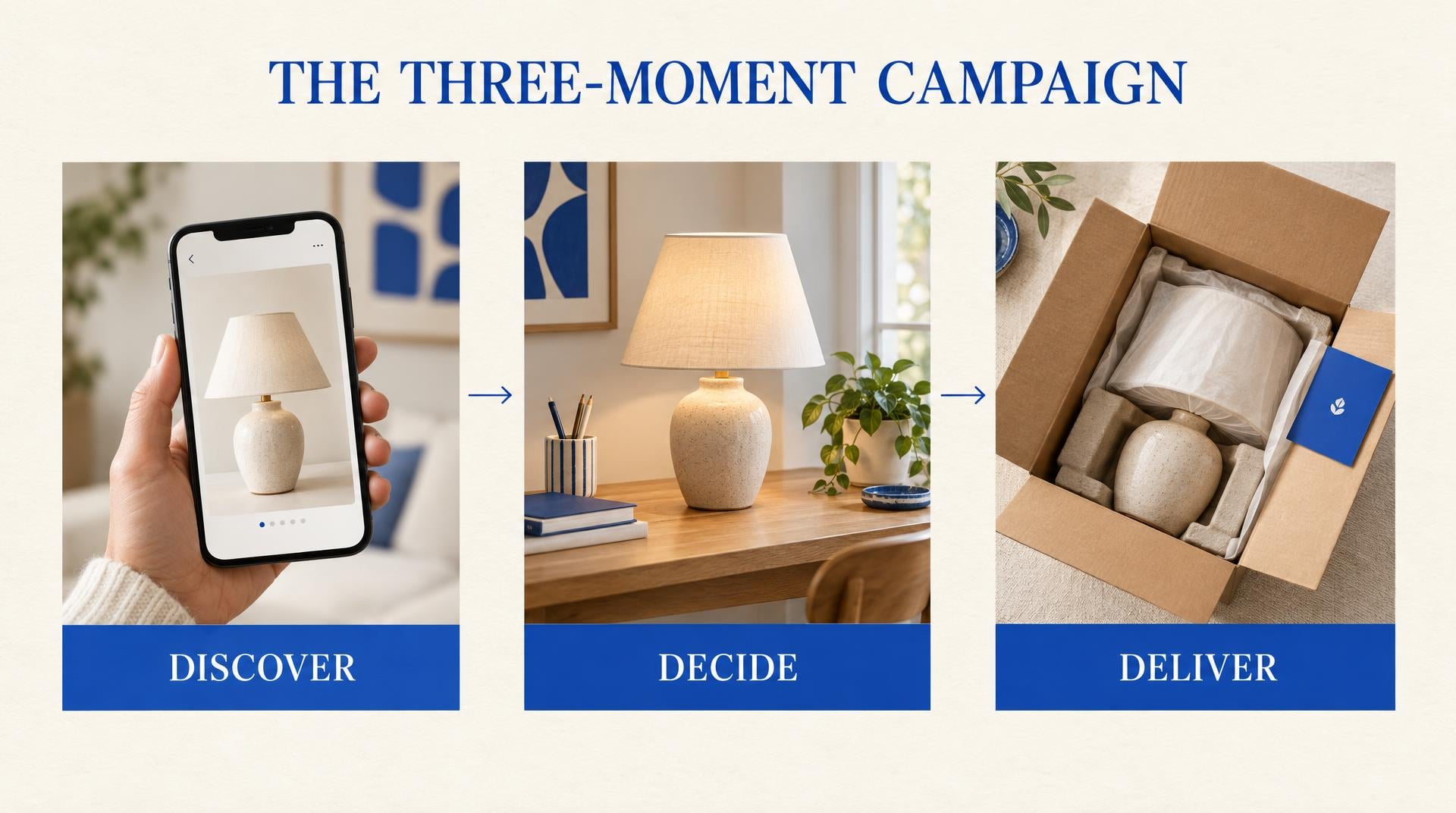
“Clean 16:9 strategy slide titled 'THE THREE-MOMENT CAMPAIGN'. Three equal vertical panels connected by a fine horizontal arrow. Panel one shows a phone discovering a ceramic lamp and is labeled exactly 'DISCOVER'. Panel two shows the lamp on a styled desk and is labeled exactly 'DECIDE'. Panel three shows an open delivery box and is labeled exactly 'DELIVER'. Warm white background, cobalt accents, subtle paper texture, concise consulting-deck aesthetic, no extra text.”
สร้างด้วย GPT Image 2.5 Flare ใน VideoGen
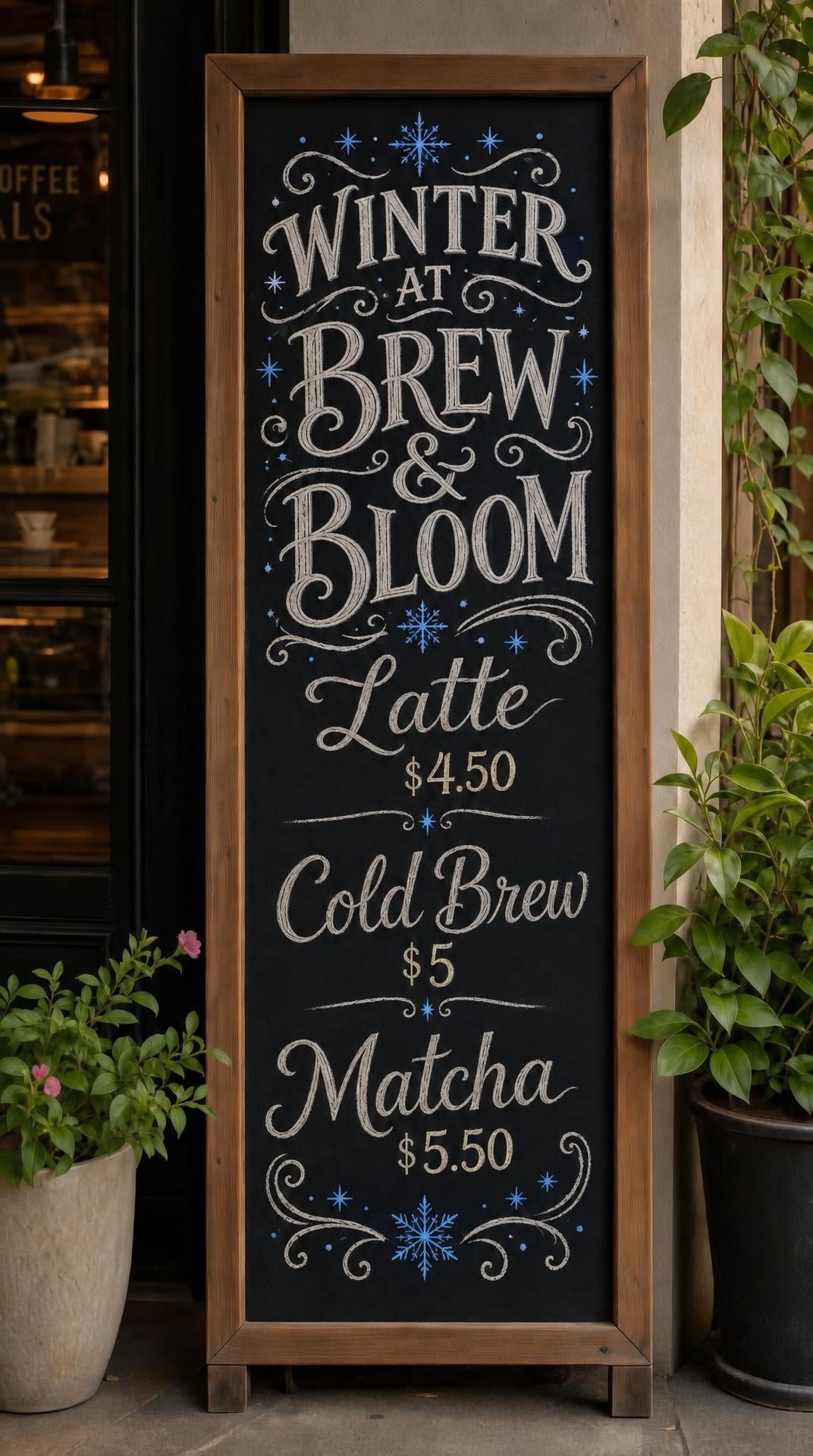
“Keep the cafe chalkboard, camera angle, hand-lettered layout, prices, and plants unchanged. Change only the seasonal treatment: replace the warm brown accent drawings with small cobalt-blue winter stars and change the heading to 'WINTER AT BREW & BLOOM'. Preserve all remaining menu text exactly.”
สร้างด้วย GPT Image 2.5 Flare ใน VideoGen
VideoGen ผสานรวม GPT Image 2.5 Flare อย่างไร
| ข้อมูลจำเพาะ | รายละเอียด |
|---|---|
| โมเดล | GPT Image 2.5 Flare |
| ประเภทข้อมูลนำเข้า | ข้อความและรูปภาพอ้างอิง |
| รูปภาพอ้างอิง | สูงสุด 16 รายการบนเอนด์พอยต์การแก้ไข |
| การแก้ไข | การแก้ไขแบบเฉพาะจุดพร้อมการรักษาวัตถุและเลย์เอาต์ที่ดีขึ้น |
| การตั้งค่าคุณภาพ | ต่ำ, ปานกลาง, สูง, สูงมาก, สูงสุด และอัตโนมัติ |
| ความละเอียด | เอาต์พุต 1K, 2K หรือ 4K |
| พื้นหลัง | PNG และ WebP แบบทึบแสงหรือโปร่งใส |
| Elo Benchmark | Unknown |
ระดับคุณภาพใน VideoGen
- ต่ำ
ระดับที่เร็วและคุ้มค่าที่สุด สร้างขึ้นสำหรับงานร่างและการทำซ้ำอย่างรวดเร็ว
- มาตรฐาน
ค่าเริ่มต้นแบบสมดุล: images คุณภาพดีในราคาที่ใช้งานได้ทุกวัน
- สูง
images คุณภาพระดับพรีเมียมสำหรับเนื้อหาที่คุณเผยแพร่
- สูงสุด
Our highest quality tier for detailed, polished images.
Use GPT Image 2.5 Flare directly in VideoGen to create images. Choose a quality tier, generate your content, and add it to a finished video in the same workspace.
วิธีการใช้ GPT Image 2.5 Flare ใน VideoGen
สร้างบัญชีฟรี
สมัครใช้งาน VideoGen เพื่อเปิดใช้พื้นที่ทดลอง AI และโปรแกรมตัดต่อ
Open a workflow
Start the storyboard to video or prompt to video workflow, or use the AI image tool inside any project.
Pick a quality tier or type a prompt
Choose the tier that fits your needs and describe what you want to create.
Generate and build your video
VideoGen builds the finished video with visuals, narration, and captions, ready to export.
GPT Image 2.5 Flare API
Developers can generate images through the VideoGen API with the same quality tier routing as the app, so requests reach models like GPT Image 2.5 Flare without managing provider keys.
curl -X POST "https://api.videogen.io/v1/tools/generate-image" \
  -H "Authorization: Bearer $VIDEOGEN_API_KEY" \
  -H "Content-Type: application/json" \
  -d '{"prompt": "A studio product shot of a ceramic mug", "quality": "max"}'
สร้างและปรับแต่งภาพสำหรับงานโปรดักชัน
สร้างโฆษณาผลิตภัณฑ์ กราฟิกพรีเซนเทชัน และภาพแคมเปญ จากนั้นอัปเดตรายละเอียดหนึ่งจุดโดยที่ยังคงวัตถุและองค์ประกอบไว้เหมือนเดิม
สำรวจ GPT Image 2.5 ใน VideoGen
อ่านบทวิเคราะห์แรกของเราเกี่ยวกับ GPT Image 2.5 และเหตุผลที่ความเที่ยงตรงของการอ้างอิง การควบคุมการตัดต่อ และความเร็วมีความสำคัญต่อขั้นตอนการทำงานวิดีโอที่สมบูรณ์
อ่านภาพรวม GPT Image 2.5เขียนพรอมต์ด้วยลำดับชั้นทางภาพที่ชัดเจน
กำหนดวัตถุ องค์ประกอบ ข้อความที่ถูกต้อง สไตล์ และข้อจำกัด เพื่อให้โมเดลสามารถสร้างภาพที่สอดคล้องกันแทนการเดา
อ่านคู่มือการเขียนพรอมต์สร้างภาพประกอบพรีเซนเทชันที่สนับสนุนการเล่าเรื่อง
ใช้การสร้างภาพสำหรับหน้าปก ไดอะแกรม และแนวคิดทางภาพ ในขณะที่ยังคงรักษาแผนภูมิข้อมูลและข้อความที่แก้ไขได้ไว้ในเครื่องมือทำสไลด์ของคุณ
อ่านคู่มือการนำเสนอสไลด์
“VideoGen ยอดเยี่ยมสำหรับการขยายการผลิตวิดีโอและปรับปรุงระยะเวลาในการส่งงาน... กระบวนการตัดต่อวิดีโอที่ซับซ้อน ซึ่งอาจใช้เวลาหลายวันหรือหลายเดือน ตอนนี้ใช้เวลาเพียงไม่กี่นาที!”
“VideoGen แก้ไขปัญหาสำคัญที่สุดของการผลิตวิดีโอ—ความซับซ้อน, ต้นทุน และเวลา เพียงไม่กี่คลิก ทุกคนก็สามารถสร้างวิดีโอคุณภาพระดับมืออาชีพที่ปราศจากลิขสิทธิ์ได้”
“VideoGen เป็นเครื่องมือที่มีค่าต่ำที่สุดสำหรับผู้สร้างเนื้อหาที่ต้องการนำเสนอเนื้อหาคุณภาพสูงสุดในเวลาที่สั้นที่สุด”
คำถามที่พบบ่อย
เปลี่ยนจากผลลัพธ์ของ GPT Image 2.5 Flare ให้กลายเป็นวิดีโอที่เสร็จสมบูรณ์
ทุกเวิร์กโฟลว์ของ VideoGen จะใช้โมเดลอย่างเช่น GPT Image 2.5 Flare โดยอัตโนมัติเพื่อสร้างวิดีโอที่สมบูรณ์พร้อมภาพประกอบ, การพากย์เสียง, ดนตรี และคำบรรยาย
เริ่มสร้างด้วย AI บน VideoGen
เข้าสู่ระบบเพื่อสร้างภาพ วิดีโอคลิป และอื่นๆ ด้วยโมเดลที่คุณเลือก
GPT Image resources ที่เกี่ยวข้อง
- GPT Imageการสร้างภาพและการแก้ไขด้วย AI ระดับมืออาชีพ
- GPT Image 2การสร้างและแก้ไขภาพด้วย AI อย่างละเอียดด้วยข้อความที่ยอดเยี่ยม
- GPT Image 2.5 is coming to VideoGen Image MaxOur first look at OpenAI's faster image generation and editing model
- GPT Image 2.5 launch guideWhat changed in GPT Image 2.5 and how to use it in VideoGen
- GPT Image 2.5 prompts for marketing imagesPrompt structures for product ads, campaigns, and visual concepts
- GPT Image 2.5 for slides and presentationsA practical workflow for covers, diagrams, and presentation visuals