GPT Image 2 Pricing, API Access, Quality, and Editing Explained
Understand GPT Image 2 pricing, quality tiers, flexible image sizes, API access, and prompt-based editing before you build it into a creative workflow.


GPT Image 2 sits at the intersection of image generation, image editing, and production workflows. If you are comparing it for a team, the useful questions are not only “How good is the image?” They are also:
- What quality tiers are available?
- How much control do I have over size and format?
- Can I edit a reference without rebuilding the whole composition?
- Does the model fit an API or product workflow?
- Can the image move directly into a video project?
This guide explains the practical GPT Image 2 details that matter before you choose it for a campaign or application.
OpenAI describes GPT Image 2 as a model for high-fidelity image generation and editing in its official ChatGPT Images 2.0 announcement. Fal's GPT Image 2 guide is a useful implementation reference because it documents the playground, endpoint shape, parameters, and pricing context in one place.
GPT Image 2 at a glance
GPT Image 2 is an OpenAI image generation and editing model available in VideoGen. The VideoGen model page lists the main capabilities:
- Output up to a 3840px long edge.
- Flexible aspect ratios from wide landscape to tall portrait.
- Prompt-based editing with image inputs.
- Strong multilingual text rendering.
- Structured compositions such as posters, labels, and infographics.
The same page includes real generated outputs. An isometric smart-home cutaway shows how GPT Image 2 handles a dense visual scene, while a vintage travel poster tests typography, composition, and a defined art direction.
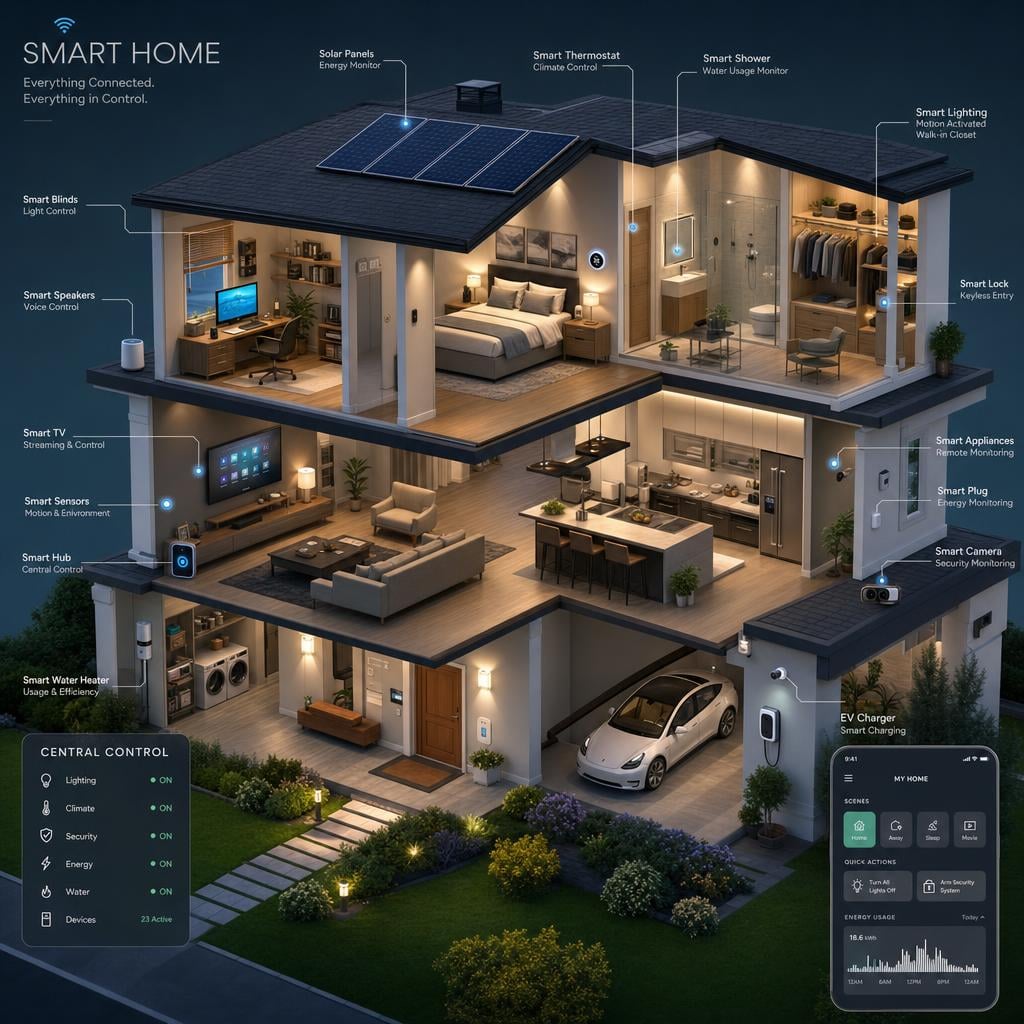

OpenAI's image generation API announcement describes the broader model family and the production use cases image generation supports.
What does GPT Image 2 cost?
As checked on September 8, 2026, Fal's GPT Image 2 pricing examples list these approximate generation costs in USD:
| Output size | Low quality | Medium quality | High quality |
|---|---|---|---|
| 1024 × 1024 | $0.01 | $0.06 | $0.22 |
| 1920 × 1080 | $0.01 | $0.04 | $0.16 |
| 3840 × 2160 | $0.02 | $0.11 | $0.41 |
For example, ten high-quality 1024 × 1024 outputs would be about $2.20 using that output estimate. Reference-image inputs and other billed tokens can add to the total. Check the provider's current quote before budgeting a batch.
These are Fal API estimates. VideoGen uses credits and shows the cost in its generation flow; its quality tiers can route to different models. Selecting a lower VideoGen tier does not necessarily mean the same model runs at a lower setting. For direct OpenAI access, consult the GPT Image 2 model documentation.
Quality and output choices
Image generation is iterative. You may want a fast draft while testing a layout, followed by a higher-quality version once the direction is approved.
In VideoGen, the image quality tier is selected in the generation flow. The practical approach is:
- Use a lower-cost tier while the brief is changing.
- Fix the prompt and composition before spending on a final render.
- Use the highest quality tier when the asset is ready for a campaign, export, or important first frame.
This is more efficient than generating every experiment at final quality. The model's output still needs visual review, especially where small text, product details, or brand marks matter.
Calculate the value of an image, not only its unit cost
An image request is often one step in a longer workflow. A low-cost draft that needs several rounds of manual cleanup may be more expensive for a team than a higher-quality first pass. When comparing model costs, record:
- The number of generations needed to reach an approved image.
- The number of edits after the first generation.
- Whether the image can be reused in multiple aspect ratios.
- Whether it becomes a first frame, storyboard reference, or product asset.
- How much designer time is spent correcting text and layout.
This is especially relevant for ecommerce teams. One product image may become a landing-page visual, a social crop, a video scene, and a thumbnail. The useful cost is the cost of the approved asset across all those placements.
Image size and aspect ratio
GPT Image 2 supports flexible output dimensions. The model page documents a long edge of up to 3840 pixels and a broad range of aspect ratios.
Choose the shape before you write the prompt:
- 16:9: landscape video frames, YouTube thumbnails, presentations.
- 9:16: short-form video, mobile ads, Stories, and Reels.
- 1:1: social tiles and product grids.
- Wide layouts: banners, headers, and cinematic establishing frames.
The aspect ratio changes the composition. A prompt written for a square product tile may not place the subject correctly in a tall frame. State the intended layout and subject position directly.
Editing and reference images
GPT Image 2 is useful when you have an image that is close but not final. Instead of starting from an empty prompt, upload the reference and name the exact change:
Keep the bottle, label, camera angle, and lighting unchanged. Replace the background with a warm limestone bathroom and add a soft shadow beneath the product. Do not add new text.
Focused editing is valuable for campaign production. A team can approve the subject and composition first, then create channel-specific variations without regenerating every detail.
What API access means for a product team
Fal's GPT Image 2 guide documents text-to-image and edit endpoints, the parameters exposed by that integration, and the JavaScript client pattern. It is a useful reference for developers evaluating the model as a standalone service.
VideoGen adds a different layer around image generation. The model is part of a routed creative workflow where a generated image can become:
- A scene visual in script to video.
- A storyboard frame.
- A first frame for prompt to video.
- A reusable entity reference.
- A slide or thumbnail.
That means the relevant cost is not only the image request. It is also how many downstream decisions the image supports before the team has to regenerate it.
GPT Image 2 inside VideoGen
Open the GPT Image 2 page in VideoGen for the model's current specs and examples. The page also links into the AI image workflow, where the credit cost is shown before you commit.
If you are deciding between models, compare it with Nano Banana 2 using the same brief. GPT Image 2 is a strong candidate for text-heavy layouts, structured marketing graphics, multilingual copy, and flexible output dimensions. Another model may win on a different reference, speed, or aesthetic requirement.
A practical evaluation plan
Before choosing a default model, run the same small evaluation set through each candidate:
- A product image with a label.
- A text-heavy poster.
- A reference-led variation.
- An image that will become a video first frame.
- A targeted edit that changes one element.
Score text accuracy, subject fidelity, layout, edit preservation, latency, and the amount of manual cleanup. This gives a more useful answer than a single impressive sample.